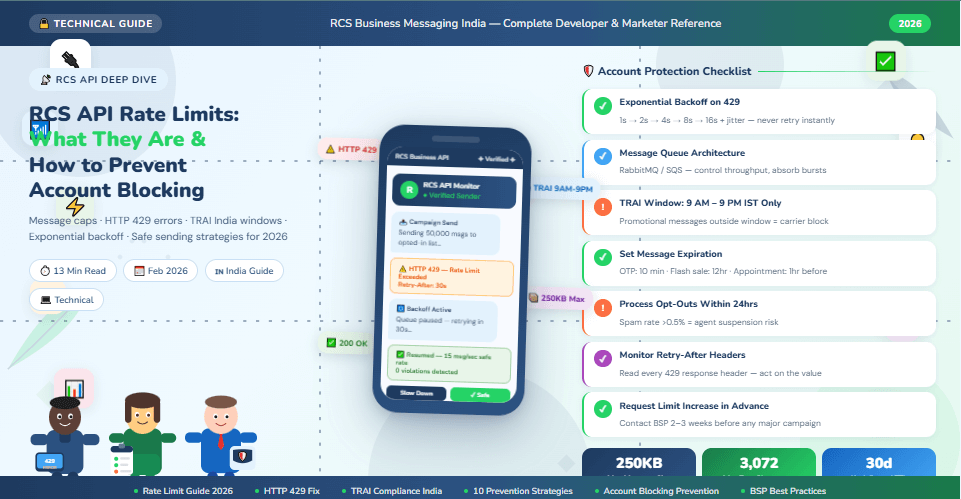
RCS API Rate Limits: What They Are and How to Prevent Account Blocking (2026 Guide)
Learn everything about RCS API rate limits in 2026 — message caps, carrier restrictions, HTTP 429 errors, exponential backoff strategies, and 10 best practices to prevent account blocking. India-focused guide.
Why RCS API Rate Limits Matter for Your Business in 2026
You've built your RCS automation. Your brand is verified. Your message templates are approved. Your campaign is ready to fire. You hit send — and within minutes, your API returns a flood of HTTP 429 errors. Messages stop delivering. Worse: your RCS agent account gets flagged or suspended. Your entire campaign grinds to a halt.
This is the rate limit problem — and it catches more businesses off guard than any other technical challenge in RCS deployment. Unlike WhatsApp, which has well-documented per-conversation pricing limits, RCS Business API (RBM) rate limits are managed across multiple layers: Google's RBM platform, your BSP, carrier-level throttling, and India's TRAI regulatory windows. Each layer has its own rules. Violating any of them can lead to message failures, account flags, or permanent suspension.
This complete guide explains exactly what RCS API rate limits are, where they come from, what happens when you exceed them, and — most importantly — the 10 proven strategies to prevent account blocking so your campaigns run cleanly, at scale, every time.
RCS API Rate Limits — 2026 Key Facts
|
Limit / Parameter |
Value / Detail |
|
Maximum RCS message size
(total AgentMessage) |
250 KB per
message — exceeding causes immediate rejection |
|
Maximum text characters per
RCS message |
3,072
characters (vs 160 for SMS) |
|
Maximum media file size per
RCS message |
100 MiB
per file — images, video, PDF, audio |
|
HTTP error for rate limit
exceeded |
HTTP 429 —
Too Many Requests |
|
Promotional RCS message
window in India (TRAI) |
9:00 AM –
9:00 PM only — messages outside window blocked |
|
Undelivered message
auto-deletion (Google RBM) |
30 days —
undelivered messages deleted after 30 days |
|
Auto-retry window after 429
error |
Use
exponential backoff — minimum 1 second delay, double each retry |
|
Key rotation to bypass rate
limits |
NOT
permitted — may violate BSP terms and trigger suspension |
|
RCS message delivery —
charged on |
Successfully
delivered messages only — failed attempts not billed |
|
Account blocking trigger |
Repeated
spam complaints, opt-out violations, or rapid burst sending |
What Are RCS API Rate Limits — Explained Simply
A rate limit is a cap on how many API requests or messages you can send within a defined time window. When you exceed this cap, the API returns an HTTP 429 error — 'Too Many Requests' — and your message is rejected until the window resets or you implement a delay.
For RCS Business API, rate limits operate at multiple levels simultaneously. Understanding each layer is critical — because exceeding any one of them triggers failures even if you are within the limits of the others.
Layer 1 — Google RBM Platform Limits
Google's RCS for Business platform (RBM API) sets the base
rate limits for all agents. These limits apply per RCS agent (your verified
brand sender) and are defined in terms of messages per second or requests per
minute. Google does not publish a single universal rate limit — limits scale
with your agent's verified status, usage history, and BSP tier.
•
New agents start with conservative limits — typically
10–30 messages per second
•
Established agents with clean history can request
higher throughput limits
•
All requests return HTTP 429 when platform limits are
exceeded
•
Google's RBM platform automatically retries undelivered
messages for up to 30 days
• Set message expiration for time-sensitive content (OTPs, flash sale offers) to stop stale delivery
Layer 2 — BSP (Business Solution Provider) Limits
Your BSP — Gupshup, Kaleyra, Route Mobile, Tanla, Infobip, or
others — applies its own rate limits on top of Google's platform limits. These
limits are set per account tier, volume contract, and use case. BSP limits are
often stricter than Google's platform limits for new accounts.
•
Starter accounts: typically 5–15 messages per second
•
Growth accounts: 50–200 messages per second
•
Enterprise accounts: 500–1,000+ messages per second
(negotiated)
•
BSP limits vary by message type: transactional vs
promotional vs conversational
• Contact your BSP to understand your exact current throughput limit and how to increase it
Layer 3 — Carrier-Level Throttling (Jio, Airtel, Vi)
In India, individual telecom carriers — Jio, Airtel, and Vi —
apply their own throttling rules on RCS message delivery. These carrier-level
limits are separate from your BSP limits and are not always publicly
documented. They are particularly relevant for high-volume campaigns.
•
Carriers throttle burst traffic to protect network
infrastructure
•
Festival season campaigns (Diwali, Holi) may face
increased carrier throttling during peak hours
•
Carrier throttling does NOT trigger HTTP 429 at the API
level — messages are delayed, not rejected
•
Your BSP should manage carrier-level pacing
automatically — verify this before launch
• Spreading campaign sends over 2–4 hours reduces carrier throttling significantly
Layer 4 — TRAI Regulatory Windows (India Specific)
India's Telecom Regulatory Authority (TRAI) mandates specific
time windows for commercial messaging. Promotional RCS messages sent outside
these windows are blocked at the carrier level — regardless of your API rate
limits.
•
Promotional RCS messages: permitted ONLY between 9:00
AM and 9:00 PM (IST)
•
Transactional RCS messages (OTP, order confirmation):
allowed 24/7
•
Service messages (account alerts, appointment
reminders): allowed 24/7
•
TRAI DND registry: customers registered on DND must be
excluded from all promotional sends
• TRAI violations result in carrier-level blocking — not just message failure
Understanding HTTP 429 Error — The RCS Rate Limit Error
When your RCS API requests exceed the allowed rate, the server returns:
|
HTTP 429 — Too Many
Requests |
|
HTTP/1.1 429 Too Many
Requests Retry-After: 30 { "error": { "code": 429, "message": "Quota exceeded
for RCS messaging agent", "status":
"RESOURCE_EXHAUSTED" } } |
The Retry-After header tells you exactly how many seconds to wait before retrying. Always read and respect this header — retrying immediately after a 429 will trigger another 429 and can escalate to a temporary account block.
What to Do When You Get HTTP 429
•
STOP retrying immediately — do not loop or retry
without a delay
•
Read the Retry-After header value — wait exactly this
many seconds before next attempt
•
If no Retry-After header: implement exponential backoff
(see Section 5)
•
Log all 429 errors with timestamp and request volume —
identify the pattern
•
Alert your engineering team if 429 errors exceed 5% of
total requests — reduce send rate
• Never use a different API key to bypass the 429 — this violates BSP terms and triggers suspension
10 Proven Strategies to Prevent RCS Account Blocking
1. Implement Exponential Backoff — The
Right Way to Handle 429 Errors
Exponential backoff is the gold-standard strategy for handling
rate limit errors. Instead of retrying immediately (which makes the problem
worse), you wait progressively longer between each retry attempt.
•
Retry 1: Wait 1 second, then retry
•
Retry 2: Wait 2 seconds, then retry
•
Retry 3: Wait 4 seconds, then retry
•
Retry 4: Wait 8 seconds, then retry
•
Retry 5: Wait 16 seconds — if still failing, pause and
alert engineering
2. Use a Message Queue — Never SendDirectly From Application Code
The single most effective architectural decision you can make
for RCS at scale is using a message queue (RabbitMQ, AWS SQS, Redis Queue, or
Google Pub/Sub) between your application and the RCS API. The queue controls
throughput, absorbs spikes, and retries failed messages automatically.
•
Application pushes messages to queue — not directly to
RCS API
•
Queue worker dequeues at a controlled rate — e.g., 20
messages per second
•
On 429: message goes back to queue with backoff delay —
no message lost
•
Queue gives you visibility: how many messages pending,
processing, and failed
•
Horizontal scaling: multiple queue workers — each
respecting rate limits independently
3. Spread Campaign Sends — Never Blast Allat Once
The most common cause of RCS account blocking is a campaign
blast — sending hundreds of thousands of messages simultaneously. Even if your
per-second rate limit is high, sudden burst traffic triggers carrier
throttling, BSP flags, and Google agent suspicion.
•
For campaigns over 10,000 messages: spread the send
over 2–4 hours minimum
•
For campaigns over 100,000 messages: spread over 6–12
hours
•
Schedule festival campaigns to start at 9:00 AM IST —
not all at once at midnight
•
Use your BSP's campaign scheduler — most support
rate-limited batch sending natively
•
Monitor delivery rates in real time — if delivery
drops, pause and investigate
4. Respect TRAI Time Windows — NoPromotional Messages Outside 9 AM–9 PM
India's TRAI mandates that promotional messages can only be
sent between 9:00 AM and 9:00 PM IST. Sending promotional RCS messages outside
this window causes carrier-level blocking — and repeated violations can result
in your RCS agent being permanently blacklisted by Indian carriers.
•
Hard-code a time-check in your campaign scheduler:
block any promotional send before 9 AM or after 9 PM IST
•
Set your BSP platform to automatically queue and hold
messages until 9 AM if triggered early
•
Transactional messages (OTP, order confirmation,
delivery alert) are exempt — allowed 24/7
•
When in doubt about message type: classify as
promotional and apply the 9 AM–9 PM rule
•
Review TRAI DND registry monthly — always exclude DND
numbers from promotional sends
5. Monitor and Respect Retry-After Headers
Every HTTP 429 response from the RCS API includes (or should
include) a Retry-After header specifying exactly how long to wait. Respecting
this header is not optional — it is the API's direct instruction on when to
safely retry.
•
Parse the Retry-After value from every 429 response
before any retry logic
•
If Retry-After is absent: default to exponential
backoff starting at 2 seconds
•
Store the Retry-After timestamp — ensure all retry
workers respect it, not just the current request
•
Alert on Retry-After values over 60 seconds — this
indicates serious throttling
•
Log Retry-After values over time — a pattern of
increasing values signals your send rate is consistently too high
6. Set Message Expiration forTime-Sensitive Content
Google's RBM platform will attempt to deliver undelivered
messages for up to 30 days. For time-sensitive content — flash sale offers,
OTPs, appointment reminders — this means customers can receive an expired offer
days later. Worse: the retried delivery counts against your rate limits when
you are already under pressure.
•
Set expiration on all promotional messages: 4–12 hours
maximum
•
Set expiration on OTP messages: 5–10 minutes (OTPs are
invalid after this anyway)
•
Set expiration on festival sale messages: duration of
the sale (e.g., 24 hours for Diwali sale)
•
Set expiration on appointment reminders: 1 hour before
appointment time
•
Messages that expire cleanly free up your delivery
queue — preventing backlog buildup
7. Use Batch Endpoints — Reduce API Callsby 10–50x
Sending individual API calls for each message is the most
rate-limit-intensive approach possible. Many BSPs provide batch endpoints that
allow you to submit 10–1,000 messages in a single API call — dramatically
reducing your per-message API overhead and rate limit consumption.
•
Check your BSP documentation for batch message
submission endpoints
•
Batch size: start with 50 messages per API call —
increase based on 429 frequency
•
Batching reduces API calls by 50x — 50,000 messages in
1,000 API calls vs 50,000 individual calls
•
Each batch call is atomic — if it fails, all messages
in the batch retry together
•
Combine batching with queue architecture for maximum
throughput and reliability
8. Manage Opt-Outs Rigorously — The #1Account Blocking Trigger
The most common cause of RCS account blocking is NOT technical
— it is sending messages to users who have opted out. High spam complaint rates
and opt-out violations trigger both carrier-level blocks and Google RBM agent
suspension. Managing opt-outs rigorously is not just good practice — it is an
account survival requirement.
•
Process opt-out requests within 24 hours — remove from
all send lists immediately
•
Include opt-out instruction in every promotional RCS
message: 'Reply STOP to unsubscribe'
•
Maintain a centralised DND/opt-out registry — sync
across all messaging channels
•
Never re-add an opted-out contact without explicit new
opt-in
•
Audit your contact lists monthly — remove contacts who
haven't engaged in 6+ months
9. Monitor Rate Limit Headers Proactively —Before You Hit the Wall
Every RCS API response includes rate limit information in the
response headers — not just when you exceed them. Proactive monitoring of these
headers allows you to slow down BEFORE hitting the 429 error, keeping your
campaign running smoothly at all times.
•
Monitor X-RateLimit-Remaining header: remaining
requests in current window
•
Monitor X-RateLimit-Reset header: timestamp when the
rate limit window resets
•
Alert engineering when remaining requests drop below
20% of quota
•
Auto-reduce send rate when remaining drops below 10% —
preventive throttling
•
Build a real-time dashboard showing: requests/second,
429 rate, remaining quota, delivery rate
10. Request Rate Limit Increases Proactively— Not During a Crisis
If your business needs higher throughput than your current
rate limits allow — for example, before a major Diwali campaign — the right
approach is to request a limit increase from your BSP or Google BEFORE the
campaign, not after you start hitting 429 errors during the send.
•
Contact your BSP account manager 2–3 weeks before any
major campaign
•
Provide projected campaign volume: total messages, send
window, messages per hour
•
Share your clean account history: low spam rate, zero
TRAI violations, consistent opt-out compliance
•
BSPs and Google grant limit increases based on account
health and business case — good history is essential
•
After limit increase: test at new rate with a small
batch before full campaign launch
RCS API Rate Limits — Complete Reference Table 2026
|
Limit Type |
Value |
What Happens
If Exceeded |
How to Avoid |
|
Max
message size |
250 KB per AgentMessage |
Immediate rejection —
message not sent |
Check payload size before
sending — strip unnecessary metadata |
|
Max text
length |
3,072 characters |
API returns error — message
rejected |
Truncate text in code —
validate before API call |
|
Max media
size |
100 MiB per file |
File rejected — message
fails to deliver |
Compress media before
upload — use optimised image formats |
|
API rate
(new agent) |
10–30 msg/second |
HTTP 429 — Too Many
Requests |
Use message queue —
implement exponential backoff |
|
API rate
(enterprise) |
500–1,000+ msg/second |
HTTP 429 if burst exceeds
limit |
Request limit increase
before major campaigns |
|
Promotional
send window (India) |
9 AM – 9 PM IST only |
Carrier-level block —
message not delivered |
Time-check in scheduler —
classify messages correctly |
|
Opt-out
processing SLA |
Within 24 hours |
Spam complaints — potential
account suspension |
Automated opt-out sync
across all lists |
|
Undelivered
message TTL |
30 days — then deleted |
Message lost if device
offline 30+ days |
Set expiration on
time-sensitive content |
|
DND
registry compliance |
Mandatory for promotional |
TRAI violation — carrier
blacklisting |
Monthly DND audit —
auto-exclude on new uploads |
|
Spam
complaint threshold |
Below 0.1% — safe zone |
Above 0.5% = agent
review/suspension |
Send only to opted-in,
engaged contacts |
Step-by-Step: Safe High-Volume RCS Sending Setup
Follow this 5-step technical setup to send RCS campaigns at scale without hitting rate limits or triggering account blocks.
|
STEP 1 |
Set Up
a Message Queue Between Your App and RCS API Install RabbitMQ, AWS
SQS, Redis Queue, or Google Pub/Sub as your message broker. Application code pushes
all RCS messages to the queue — never directly to RCS API. Configure a queue
worker that dequeues at a safe rate (e.g., 15 messages/second for new
accounts). Worker handles 429
errors by re-queuing the message with an exponential backoff delay. Monitor queue depth in
real time — alert if queue grows faster than it drains. |
|
STEP 2 |
Implement
Exponential Backoff With Jitter In your queue worker,
wrap every RCS API call in a try-catch block. On HTTP 429: read the
Retry-After header value and wait that many seconds minimum. If no Retry-After
header: start backoff at 1 second, double on each retry (1 → 2 → 4 → 8 → 16
sec). Add random jitter: add
0–1 second random delay to each backoff to prevent thundering herd. Set a maximum retry
limit: after 5 failed retries, move message to dead-letter queue and alert. |
|
STEP 3 |
Build
a TRAI Compliance Layer Create a message
classifier that labels each message: Promotional, Transactional, or Service. Promotional messages:
time-gate to 9 AM–9 PM IST — queue overnight sends to release at 9 AM. Load TRAI DND registry
monthly — store in your database and auto-exclude on all promotional lists. Log message
classification for every send — maintain audit trail for TRAI compliance
review. Alert immediately if
any promotional message is attempted outside the 9 AM–9 PM window. |
|
STEP 4 |
Set
Expiration on All Time-Sensitive Messages Promotional messages:
set expiration to 12 hours from send time — prevents stale delivery. OTP messages: set
expiration to 10 minutes — OTPs are invalid after this window. Flash sale messages:
set expiration to the sale end time — no post-sale deliveries. Festival campaign
messages: set expiration to 24 hours — prevents next-day re-delivery. Appointment reminders:
set expiration to 1 hour before appointment — prevents late delivery. |
|
STEP 5 |
Monitor,
Alert, and Request Limit Increases Build a real-time
monitoring dashboard: requests/second, 429 rate, delivery rate, opt-out rate. Set alerts: 429 rate
> 1% — auto-reduce send speed. Opt-out rate > 0.1% — pause campaign. Review monitoring data
after every major campaign — identify patterns and optimise. Contact your BSP 2–3
weeks before any campaign over 500,000 messages — request limit increase. Maintain a clean
account history — it is the most powerful tool for getting limit increases
approved. |
7 Common Mistakes That Lead to RCS Account Blocking
|
Mistake |
Why It
Causes Blocking |
The Fix |
|
Retrying
immediately after HTTP 429 |
Rapid retries escalate
throttling to account flag |
Always implement
exponential backoff — minimum 1 second wait, doubling each retry |
|
Sending
promotional messages at midnight or 6 AM |
TRAI violation — carrier
blacklisting of sender ID |
Hard-code 9 AM–9 PM IST
gate in all promotional send logic |
|
Not
processing opt-outs within 24 hours |
High spam complaint rate —
BSP flags account |
Automate opt-out processing
— sync across all messaging channels within 1 hour |
|
Sending
without a message queue — direct API calls |
Burst traffic spikes
trigger immediate 429 and flags |
Use RabbitMQ, SQS, or Redis
Queue — control throughput programmatically |
|
Using
multiple API keys to bypass limits |
Explicit BSP/Google policy
violation — permanent suspension |
Request legitimate rate
limit increase from BSP — never rotate keys to bypass |
|
Sending to
DND-registered numbers |
TRAI violation — serious
regulatory consequences |
Load DND registry monthly —
auto-exclude on all promotional campaign uploads |
|
No message
expiration on OTPs and flash sales |
Stale messages delivered
days later — customer confusion + spam reports |
Set messageExpireTime on
all time-sensitive messages before sending |
Frequently Asked Questions — RCS API Rate Limits
Q1: What is the exact RCS API rate limit per second in India?
Google does not publish a single universal rate limit for the RCS for Business (RBM) API — limits are set per agent based on verification status, account history, and BSP tier. New agents typically start at 10–30 messages per second. Established agents with clean sending history can request higher limits — up to 500–1,000+ messages per second for enterprise accounts. Contact your BSP to confirm your current limit and request an increase before any major campaign.
Q2: What happens if I send RCS messages outside 9 AM–9 PM in India?
Promotional RCS messages sent outside the 9:00 AM – 9:00 PM IST window (mandated by TRAI) are blocked at the carrier level. The message is not delivered, and no API error is returned to your application — the message silently fails at the carrier. Repeated TRAI timing violations can result in your sender ID being blacklisted by Indian carriers (Jio, Airtel, Vi), making all future RCS messages from your brand non-deliverable.
Q3: How do I fix an HTTP 429 error in my RCS API integration?
When you receive an HTTP 429: (1) Stop retrying immediately, (2) Read the Retry-After response header and wait that number of seconds, (3) If no Retry-After header, implement exponential backoff starting at 1 second (double each retry: 1 → 2 → 4 → 8 → 16 seconds), (4) Add 0–1 second random jitter to prevent concurrent processes from retrying simultaneously, (5) Log all 429 errors with timestamps and volumes to identify the root cause, (6) If 429s persist, reduce your overall send rate or contact your BSP to increase your limit.
Q4: Can I use multiple RCS API keys to send more messages and avoid rate
limits?
No — this is explicitly prohibited. Most BSPs and Google's RBM policies forbid using multiple API keys to circumvent rate limits. Detection results in immediate account suspension — not just continued throttling. The correct approach is to request a legitimate rate limit increase from your BSP by providing your campaign requirements, projected volume, and clean account history.
Q5: What triggers RCS account blocking — and can it be reversed?
RCS account blocking is typically triggered by: spam complaint rate above 0.3–0.5%, sending to opted-out contacts, TRAI timing violations, or repeated rate limit violations. Minor violations result in temporary throttling. Serious or repeated violations result in agent suspension. Account restoration requires submitting a formal appeal to your BSP with documentation of corrective actions taken. Prevention is significantly easier than recovery — a single suspension can take 2–6 weeks to resolve.
Q6: Does RCS have different rate limits for transactional vs promotional
messages?
Rate limits are generally applied at the API level (per second/minute), not per message type. However, message classification (transactional vs promotional vs service) affects TRAI timing compliance, carrier routing, and BSP policy — not the raw API rate limit. Transactional messages can be sent 24/7, while promotional messages are restricted to 9 AM–9 PM IST. Your BSP may also have different throughput SLAs for transactional vs promotional traffic — verify this with your account manager.
Q7: How do I calculate the right message queue rate for my RCS campaigns?
Formula: Safe Send Rate = (Your BSP Rate Limit in msg/second) x 0.75. The 0.75 factor (75% of limit) provides headroom for carrier throttling, occasional spikes, and burst traffic without hitting the 429 threshold. Example: if your BSP limit is 100 msg/second, configure your queue worker to dequeue at 75 msg/second maximum. For festival campaigns, use 60% of your limit to account for increased carrier throttling during peak periods.
Q8: Should I enable SMS fallback and does it count against RCS rate limits?
Yes — always enable SMS fallback. When an RCS message cannot be delivered (device not RCS-capable, network issue, or recipient offline), SMS fallback ensures the customer still receives the message. SMS fallback messages are delivered via your SMS API — they do not count against your RCS API rate limits. They are billed separately as standard SMS messages. Confirm with your BSP that automatic fallback is active before any campaign launch.
RCS Rate Limit Quick Reference Card
|
Scenario |
Safe Action |
What to Avoid |
|
HTTP 429 received |
Stop sending — read
Retry-After — implement exponential backoff |
Retrying
immediately — escalates to account block |
|
Festival campaign (Diwali,
Holi) |
Spread over 6–8 hours
starting 9 AM IST — use queue |
Midnight
blast or single-burst send |
|
OTP or time-sensitive
message |
Set expiration to 5–10
minutes — use transactional type |
No expiry
— customer receives expired OTP days later |
|
New RCS agent account |
Start at 10 msg/second —
increase gradually over 30 days |
Full-speed
campaign on Day 1 — triggers immediate block |
|
Rate limit approaching |
Auto-reduce send rate to
60% of quota — alert team |
Wait for
429 — proactive monitoring prevents the error |
|
Opt-out request received |
Remove from all lists
within 1 hour — sync to all channels |
Batch
processing weekly — violates opt-out SLA |
|
Large campaign (100k+
messages) |
Request BSP limit increase
2–3 weeks before — document volume |
Launch
without limit increase — 429s throughout campaign |
|
Promotional message at 8:55
PM |
Queue and hold — deliver
from 9 AM next day |
Send at
8:55 PM — carrier may block entire batch |
Conclusion
RCS API rate limits are not obstacles — they are guardrails. They exist to protect carrier infrastructure, ensure fair access across all businesses, and prevent spam abuse that would degrade the channel for everyone. Understanding and working within these limits — rather than trying to bypass them — is what separates professional RCS implementations from amateur ones.
The 10 strategies in this guide — from exponential backoff and message queues to TRAI compliance and proactive monitoring — give you everything you need to send RCS campaigns at any volume without hitting rate limits or risking account blocking. Implement them before your first major campaign, not after your first suspension.
Maintain your account health consistently. Honour opt-outs
immediately. Respect TRAI windows. Monitor your 429 rate proactively. Request
rate limit increases well in advance. Do these things, and your RCS channel
will be a reliable, high-performance asset for your business for years to come.